
Security Camera for Your Home: How to Choose an IP Camera
AllDigital technical team~9 min read
Short answer
- For most homes a 4 MP camera is enough. It takes half the disk space of an 8 MP camera.
- In the yard, fit a camera with an IP67 housing that is powered over a PoE cable. Indoors, a pan-and-tilt Wi-Fi camera will do.
- A 2.8 mm lens sees wide (104°), but shows a face clearly only up to about 6 meters.
- For the night, pick a camera with hybrid light: infrared and white light together.

Choosing a security camera (also called a surveillance or CCTV camera) looks hard because the spec sheet is full of unfamiliar words. In practice a home needs just five decisions: where the camera goes, how many megapixels you want, which lens, what kind of night vision, and how it connects to the network. Let's take them in order.
Outdoor or indoor camera: decide the spot first
A yard and a room need different cameras. Outside, a camera has to stand up to rain, dust and frost. Inside that does not matter, but it is handy when the camera can turn and carry sound as well.
Outdoor (yard, gate) | Indoor (room) | |
|---|---|---|
| Housing protection | ||
| Housing protection | Outdoor (yard, gate)IP66 or IP67 | Indoor (room)Not needed |
| Connection | ||
| Connection | Outdoor (yard, gate)Network cable (PoE) | Indoor (room)Wi-Fi |
| Power | ||
| Power | Outdoor (yard, gate)Over the same cable | Indoor (room)From a wall socket, with an adapter |
| Operating temperature | ||
| Operating temperature | Outdoor (yard, gate)-30 … +60 °C | Indoor (room)0 … +40 °C |
How many megapixels do you need
A megapixel count tells you the resolution of the picture: more pixels mean more detail. But more detail also takes more room on the disk. Most of the IP cameras in our catalog are 4 MP, and for a home that is a good middle ground.
A 30-day recording from 4 cameras (4 MP) needs about 5.6 TB, and 8 MP cameras need twice that. You will find tables and a calculator in the article How many terabytes do your cameras need.
Lens: 2.8 mm or 4 mm
The focal length sets how wide the camera sees. A small number gives a wide view, a large number gives a narrow view that reaches further. The price of a wide view is that the face of a person standing far away is small in the frame.
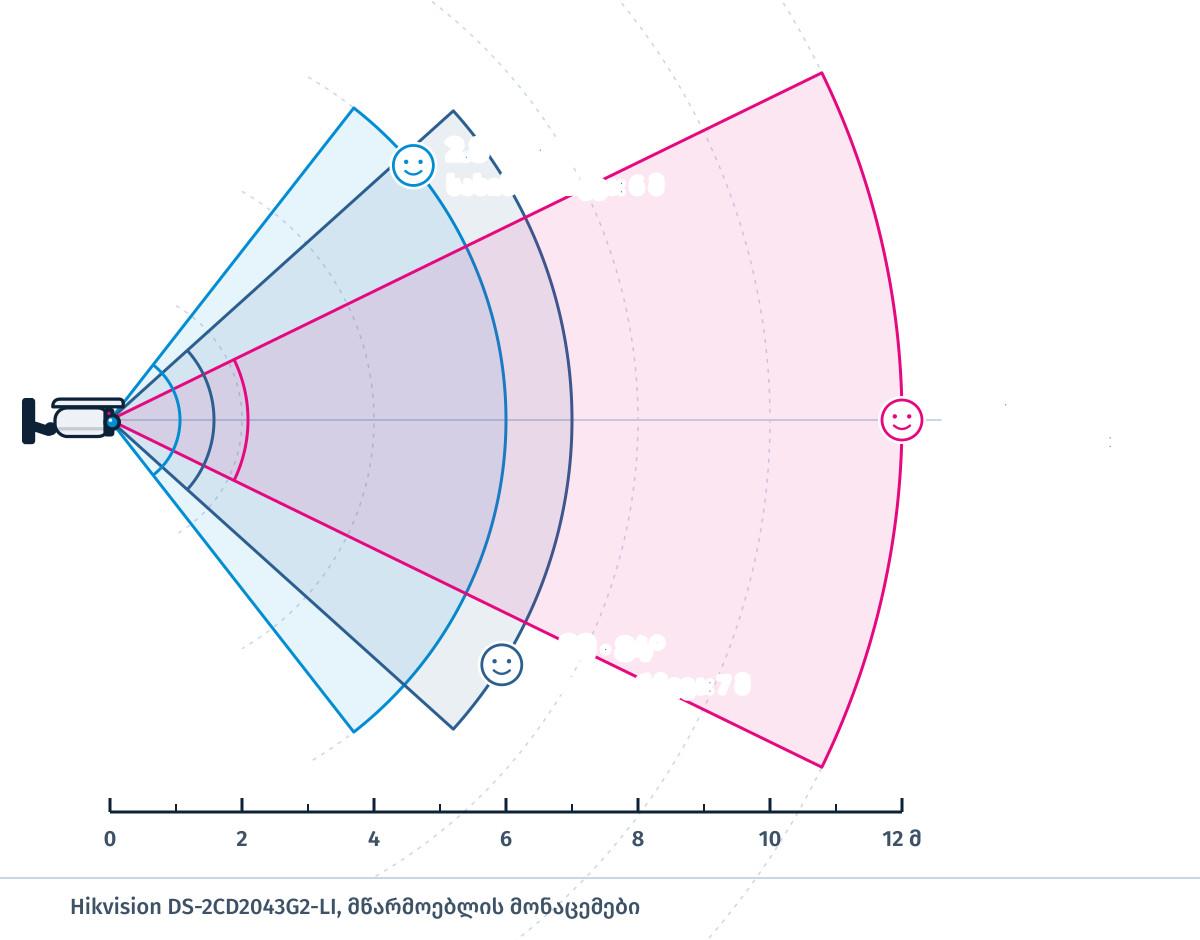
Field of view | Face identification | |
|---|---|---|
| 2.8 mm | ||
| 2.8 mm | Field of view104° | Face identificationup to 6 m |
| 4 mm | ||
| 4 mm | Field of view84° | Face identificationup to 7 m |
| 6 mm | ||
| 6 mm | Field of view52° | Face identificationup to 12 m |
For a general view of the yard, take 2.8 mm. For a gate or a long driveway, where a face has to be made out from further away, 4 or 6 mm is the better choice.
Night vision: infrared or white light
Infrared light (IR) is invisible to the eye and gives a black-and-white picture in the dark. White or warm light shines like an ordinary lamp and gives you a color picture at night too. Newer models often have both: this is called hybrid light (in the catalog: "Dual light", Smart Hybrid Light or Smart Dual Light).
Below are two outdoor cameras with hybrid light. Both are 4 MP, with an IP67 housing, a built-in microphone and PoE power. The card shows the live price and stock.
Hikvision
Camera, Hikvision DS-2CD2043G2-LI(2.8mm)(O-STD)4 MP Acusense Smart Hybrid Light Fixed Bullet Network Camera
Top357 ₾In stock. Kutaisi: Low stock. Tbilisi: Out of stock. Batumi: Out of stock
TopDahua
IPC-HFW2449S-S-IL 2.8mm 4MP Bullet network camera metal housing IP67, Mic, IR/Warm light 30m
Top324.03 ₾In stock. Kutaisi: Out of stock. Tbilisi: Out of stock. Batumi: Out of stock
Top
 Hikvision
 Dahua
Smart detection: fewer false alarms
An ordinary camera sends you a notification for every movement. Smart detection tells who or what is moving. Hikvision's AcuSense, for example, recognizes people and vehicles and so cuts false alarms: your phone no longer buzzes for every cat and every branch swaying in the wind.
PoE or wireless (Wi-Fi) camera: how it connects to the network
PoE means the camera is powered through a single network cable and sends its video over that same cable. A wireless (Wi-Fi) camera needs no network cable, but it still needs a wall socket nearby.
PoE (wired) | Wi-Fi | |
|---|---|---|
| Cable | ||
| Cable | PoE (wired)One: power and video | Wi-FiPower adapter only |
| What it needs | ||
| What it needs | PoE (wired)A PoE recorder or PoE switch | Wi-FiA Wi-Fi router |
| Recording | ||
| Recording | PoE (wired)On the recorder's disk | Wi-FiOn a microSD card or a recorder |
| Best for | ||
| Best for | PoE (wired)Yard, several cameras | Wi-FiRoom, 1-2 cameras |
For several outdoor cameras we recommend PoE. How to pick a switch or recorder is explained in the article PoE: what it is and how to calculate the budget. For one or two cameras Wi-Fi is simpler. Here are two examples: the first is an outdoor camera (IP66) that pans and tilts, the second is made for a room. Both have two-way audio, so you can talk through the camera.
Tapo
Tapo C520WS 4MP outdoor PTZ, Wifi, Mic, SD, Smart Tracking, IR/Color 30m
Top150 ₾In stock. Kutaisi: In stock. Tbilisi: Out of stock. Batumi: Out of stock
Top
 Tapo
Where the recording is stored
You have two options. The first: a microSD card right in the camera. All four cameras shown above have a card slot. This is convenient for one or two cameras.
The second: a network video recorder (NVR) with a hard disk. The recordings from every camera are kept in one place and shown on one screen. For example, the 4-channel PoE recorder Hikvision DS-7104NI-Q1/4P/M(D) powers four such cameras (up to 7.5 W each) by itself and takes a disk of up to 6 TB. For a long cable run or more cameras, add a separate PoE switch. A 6 TB disk is enough for a 30-day archive from 4 cameras (4 MP), though with nothing to spare: if you want more days, turn on motion-only recording or take a recorder that accepts a larger disk. Read about recorder types here: NVR vs DVR.
Don't want to pick the parts one by one? In the storage calculator's kits the cameras, recorder and disk are already matched for you.
Check before you buy: 5 steps
Location.
Count how many cameras will go outside and how many inside.
Protection.
On the outdoor camera's page, find the "IP / IK Rating" row: it should say IP66 or IP67.
Lens.
2.8 mm for a wide view, 4 or 6 mm for a distant spot.
Power.
In the "Power Supply" row, see whether it has PoE or an adapter. A PoE camera needs a PoE recorder or switch.
Recording.
Decide: a microSD card or a recorder with a disk. Work out the disk size with the calculator.
Point the camera at your own property and follow Georgia's Law on Personal Data Protection.
Short animation: five decisions when choosing a home IP camera
0:50
Frequently asked questions
Can I use an IP camera without a recorder?
Yes, if the camera has a microSD card slot. The recording is kept on the card and you can watch it from your phone. For several cameras a recorder is more convenient.
Which app do I use to view the camera on my phone?
That depends on the brand. Hikvision cameras work with Hik-Connect, Dahua cameras with DMSS, and Tapo cameras with the Tapo app. The compatible software is listed on the product page.
Can I combine a camera from one brand with a recorder from another?
Often, yes. ONVIF is an open standard that lets cameras and recorders from different manufacturers work together. We still recommend asking us about the specific pair before you buy.
How many cameras does a house need?
That depends on what you want to see: the entrance, the yard, the gate or the garage. If you are not sure, leave us a request: a technician will call you and help.
Does the camera need internet?
Not for recording: the camera records to the recorder or the card without internet. You need internet if you want to view the camera from your phone when you are away from home.
Pick a camera in the catalog. If you would rather not run cables and set the system up yourself, we will do it: we install across Georgia. Our shop is in Kutaisi, and the work carries a 12-month warranty.
AllDigital technical team
CCTV and security system specialists
AllDigital has sold CCTV and security systems since 2012. Our shop is in Kutaisi, and we deliver and install across Georgia. The figures in these articles come from the manufacturers' official sources and our catalogue.
