
NVR vs DVR: What Is the Difference and Which Recorder Should You Buy
AllDigital technical team~8 min read
Short answer
- An NVR records video from IP cameras over network cable. A DVR records video from analog cameras over coaxial cable.
- For a new system, go with an NVR: with a PoE recorder each camera needs a single cable for both power and video.
- If coaxial cable is already run through your home, a DVR lets you keep that cable.
- There is a middle road too: a hybrid recorder (XVR) accepts both analog and IP cameras.

A video recorder is the box that saves your camera footage to a disk and shows it to you on your phone. There are two main types, and one cannot stand in for the other: each works with its own kind of camera. That is why the recorder and the cameras are chosen together.
What an NVR is and what a DVR is
An NVR is a network video recorder for IP cameras. An IP camera processes the image itself and sends it to the recorder over network cable, the same way a computer talks to a router.
A DVR is a video recorder for analog cameras. This kind of camera sends its signal over coaxial cable. Modern analog formats such as HD-TVI carry HD video over that same cable, so an old system can be upgraded without replacing the cable.
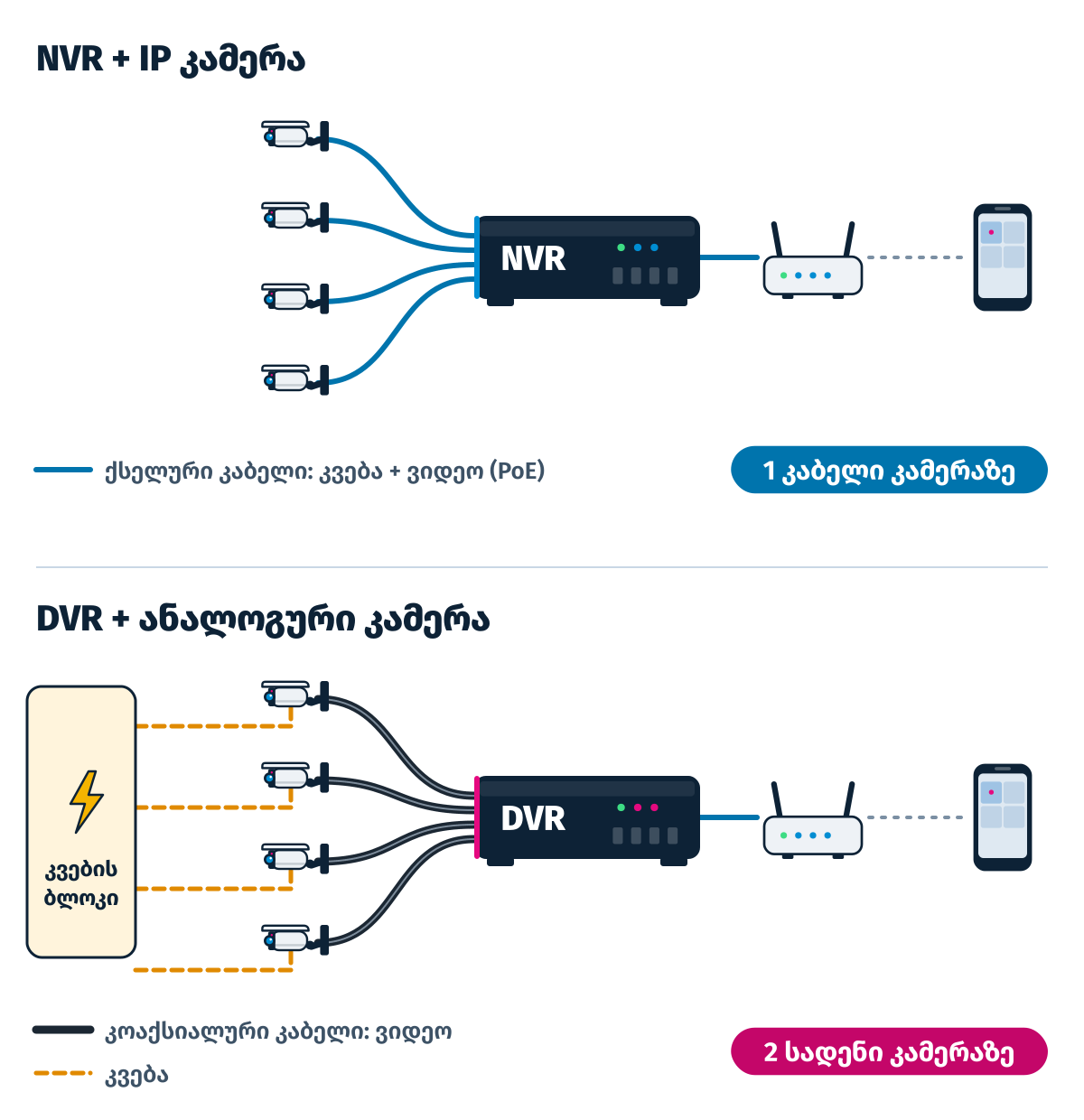
NVR vs DVR: the comparison in one table
NVR (recommended) Our pick | DVR | |
|---|---|---|
| Camera | ||
| Camera | NVR (recommended) Our pickIP camera | DVRAnalog camera |
| Cable | ||
| Cable | NVR (recommended) Our pickNetwork | DVRCoaxial |
| Camera power | ||
| Camera power | NVR (recommended) Our pickOver the same cable (PoE) | DVRSeparate power supply |
| Best for | ||
| Best for | NVR (recommended) Our pickA new system | DVRUpgrading an old one |
The biggest difference is the cable. With a PoE recorder, an IP camera needs one network cable: power and video both travel over it. A single network cable run should not be longer than 100 meters. An analog camera needs a coaxial cable for video, plus a separate wire and a power supply for power.
Example: two 4-channel recorders from our catalog
A "channel" tells you how many cameras a recorder can connect. Below are two 4-channel models: one NVR and one DVR. The price and stock on each card are live.
Hikvision
Recorder, NVR Hikvision, DS-7104NI-Q1/4P/M(D), 1sata, 4ch, Poe
404 ₾In stock. Kutaisi: Out of stock. Tbilisi: Out of stock. Batumi: Out of stock
HiLook
4-channel analog video recorder DVR - 2MP, 1 hard drive, Mini, HiLook
151.87 ₾In stock. Kutaisi: Out of stock. Tbilisi: Out of stock. Batumi: Out of stock
 Hikvision
 HiLook
Hikvision DS-7104NI-Q1/4P/M(D) | HiLook DVR-104G-K1(S) | |
|---|---|---|
| Type | ||
| Type | Hikvision DS-7104NI-Q1/4P/M(D)NVR | HiLook DVR-104G-K1(S)DVR |
| Cameras | ||
| Cameras | Hikvision DS-7104NI-Q1/4P/M(D)4 IP | HiLook DVR-104G-K1(S)4 analog (also accepts an IP camera) |
| Recording resolution | ||
| Recording resolution | Hikvision DS-7104NI-Q1/4P/M(D)Up to 6 MP | HiLook DVR-104G-K1(S)2 MP |
| PoE ports | ||
| PoE ports | Hikvision DS-7104NI-Q1/4P/M(D)4 | HiLook DVR-104G-K1(S)None |
| Max. disk | ||
| Max. disk | Hikvision DS-7104NI-Q1/4P/M(D)6 TB | HiLook DVR-104G-K1(S)4 TB |
In this pair, the NVR records a sharper picture and powers the cameras itself. The DVR has a different strength: it works on existing coaxial cable, so you do not have to run new cable. This is a comparison of one pair, not a rule: our catalog also has 5 MP and 8 MP analog cameras.
What they have in common
Despite the differences, both recorders do the same job. Both take a hard disk that stores the footage. Both connect to a monitor or a TV: the two models shown above each have HDMI and VGA outputs. And you can watch both from your phone.
So it is not the recorder that decides the choice, it is the cameras and the cable. Decide which cameras you will have first, then match the recorder to them.
How many channels and how much capacity you need
Recorders are chosen by channel count. Our catalog has NVRs with 4, 8, 16 and more channels. If you are installing 4 cameras today but expect to add more later, go straight to an 8-channel model: the spare channels will save you from replacing the recorder down the line.
An NVR has one more limit: incoming bandwidth, meaning how many megabits it can take from all cameras combined. The recorder in our example accepts 40 Mbps. Four cameras (4 MP, H.265) send about 16.4 Mbps, so there is plenty of headroom. Check your own system with the bandwidth calculator.
Choose an NVR if...
- you are building the system from scratch and no cable has been run yet;
- you want a 4 MP or sharper picture;
- you want one cable going to each camera, with no power outlet needed;
- you plan to add cameras later. When you run out of PoE ports, a PoE switch will help.
For help choosing cameras, read IP Camera for Home. For working out the power, see PoE: What It Is and How to Calculate the Budget.
Choose a DVR if...
- coaxial cable is already in place and you do not want to open up the walls again;
- your old analog cameras still work and you are only replacing the recorder;
- you need a few cameras and a 2-5 MP picture is good enough for you.
Browse every model in the categories Analog video recorders (DVR/XVR) and Analog cameras. To see which system comes out cheaper, read CCTV System Cost.
XVR: a hybrid recorder for both
If you have an analog system and want to move to IP step by step, look at a hybrid recorder. For example, the Dahua XVR1B04-I/T accepts analog signals (HDCVI, AHD, TVI, CVBS) as well as IP cameras. The old cameras stay where they are, and every new one you add is already IP.
Four mistakes people make when buying
The types do not match.
IP cameras need an NVR, analog cameras need a DVR or an XVR. Decide on the cameras first.
The recorder cannot record the camera's resolution.
Look for the "Recording Resolution" row on the recorder's page. If it says 2 MP, you will not be able to store the full picture from a 5 MP camera.
Not enough PoE ports.
An 8-channel recorder does not always have 8 PoE ports. Some have none at all and need a separate PoE switch.
The disk is over the limit.
Compare the disk size with the "Max. Capacity per Disk" row.
Short animation: the difference between NVR and DVR recorders and when to choose each
0:50
Frequently asked questions
Can I connect an IP camera to a DVR?
With some models, yes. For example, the HiLook DVR-104G-K1(S) accepts an IP camera alongside analog ones. How many and at what resolution is listed on the page of the specific recorder, in the "Signal Support" row.
Are an XVR and a DVR the same thing?
Almost. An XVR is an analog recorder that accepts several analog formats and IP cameras as well. On our site both are in the same category.
Does a recorder come with a disk?
That depends on the model, so check the product page or ask us. The recorder's description shows how many disk bays it has and what disk size it takes.
Can I watch both types of recorder on my phone?
Yes. The Hikvision and HiLook recorders in this article work with the Hik-Connect app, and the Dahua recorder works with DMSS.
How many days of footage does a recorder keep?
That depends on the disk size, the number of cameras and their resolution. For examples and tables, read How Many TB Do Your Cameras Need.
Not sure which cable is already in your walls? Leave us a request: a technician will call you and tell you which recorder fits. We install all across Georgia.
AllDigital technical team
CCTV and security system specialists
AllDigital has sold CCTV and security systems since 2012. Our shop is in Kutaisi, and we deliver and install across Georgia. The figures in these articles come from the manufacturers' official sources and our catalogue.
